Veeam Endpoint Backup FREE 1.5 nie łączy się z bazą danych? Odtworzenie bazy przez wpis w rejestrze, krok po kroku.
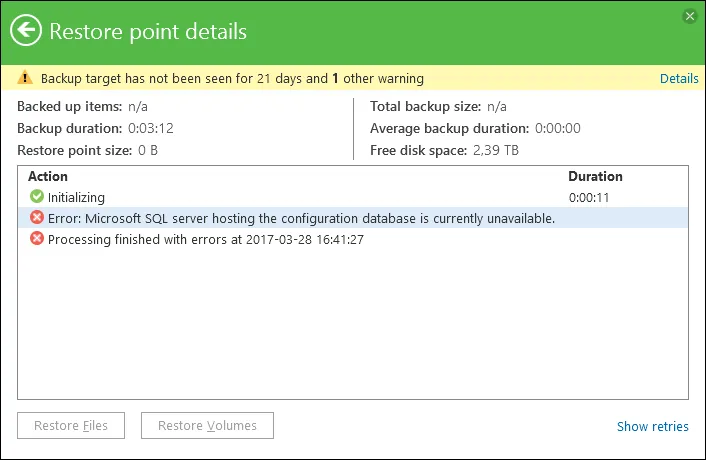
1. Go to Control panel > Administrative Tools and run Services. Stop the Veeam Endpoint Backup service.
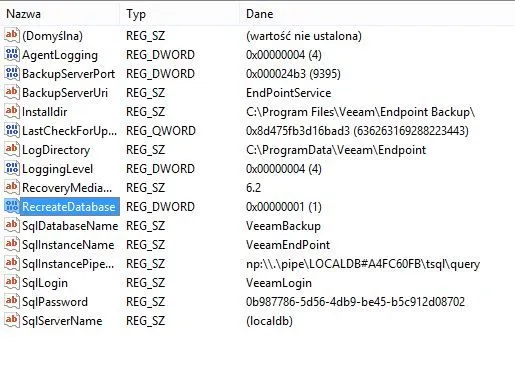
2. Run regedit.exe and locate the HKEY_LOCAL_MACHINE\SOFTWARE\Veeam\Veeam Endpoint Backup key. Create the following value under this key:
Name = Recreatedatabase Type = DWORD Value = 1
3. Start Veeam Endpoint Backup service
4. Allow some time for the new database instance to be created (5 minutes should be enough).
5. Stop Veeam Endpoint Backup service
6. Run regedit.exe and delete the Recreatedatabase value from HKEY_LOCAL_MACHINE\SOFTWARE\Veeam\Veeam Endpoint Backup key.
7. Move VeeamBackup.mdf and VeeamBackup_log.ldf replacing the existing files in the target folder
From: C:\Windows.old\windows\System32\config\systemprofile To: C:\Windows\System32\config\systemprofile
8. Start Veeam Endpoint Backup service.
Polecane
Linki partnerskie – za zakup przez nie mogę otrzymać prowizję.


Polecany sprzęt
- Silver Monkey M70 Wireless Comfort Mouse Black Silentx-kom.pl ↗
- WD Elements Portable 2TB USB 3.0 Czarnyx-kom.pl ↗
- Sandisk 128GB Dual Go USB Type-C 150MB/sx-kom.pl ↗
- HP 250R G10 Core 5-120U/32GB/1TB/Win11PXal.to ↗
- Apple iPhone 18 Pro 256GB burgundx-kom.pl ↗
Linki partnerskie programu SalesMasters (x-kom) – za zakup przez nie mogę otrzymać prowizję.